

No Deposit
Free Spins
Pay by Phone
OTT Voucher
Instant EFT
High Roller
Bonuses SA
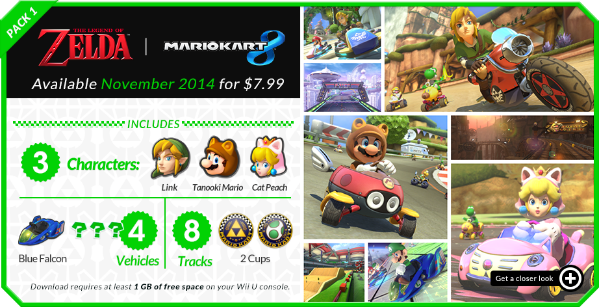
Here a preview of my Rip :
Mute City Results :
Mute City Results (http://www.mediafire.com/listen/116b71qbqawcwph/Mute+City+Results.mp3)
Special Thank to Crediar to rip those file :
Index of /Wii U (http://109.163.233.168/Wii%20U/)
All music was ripped directly from the game himself 😀 and convert with foobar with this plugins foobar2000: Components Repository – vgmstream decoder (http://www.foobar2000.org/components/view/foo_input_vgmstream)
Download link [320KBPS]
https://www.dropbox.com/sh/0z18t3puggtcnrt/AACKQESiIugUqNQ2bI2muEFTa?dl=0
Download link [WAV]
https://drive.google.com/file/d/0B8GkIq6k8A06Wk81b3VzOXh6ZlU/view?usp=sharing
———- Post added at 01:01 PM ———- Previous post was at 12:54 PM ———-
Nevermind, I didn’t notice the plugin convertor. My bad. Thanks again.
Yeah sure I will do it 😉
———- Post added at 09:43 PM ———- Previous post was at 09:43 PM ———-
Is there any chance you can post the rest of Mario kart 8? The link from Crediar seems to download a large file that doesn’t even open because it’s damaged.
Yeah sure I will do it 😉
Really enjoyed playing the new tracks and as Link on Mario Kart 8 but after 20hrs of it got stale, boring and I just couldn’t play it any more.
You know the music was ripped from the game…? I heard all the music and don’t have noise background
I know that which makes it seem even more strange because such thing shouldn’t happen on such quality. I guess something’s wrong with my equipment or so.
I get this too if I play the music in iTunes, it’s okay in VLC and Audacity. It sounds like a very low bitrate song, a few seconds in and crazy artefacts come in.
I "fixed" it by loading the MP3s into Audacity, exporting as Wav, importing into iTunes and converting back to MP3. It’s not the best solution!
I "fixed" it by loading the MP3s into Audacity, exporting as Wav, importing into iTunes and converting back to MP3. It’s not the best solution!
This is an iTunes problem. It will screw with the playback of anything running at less than 44.1 kHz. I’m assuming your work around is effective because one of those steps also resamples the track.
Normally you never encounter this problem with normally produced music, but with things like game rips it’s not totally uncommon to encounter different sample rates. Just know that the track itself is fine, and it will even play fine if you transfer it to your mp3 player.
If you aren’t completely against using other media players, I highly recommend foobar2000. I switched from iTunes to foobar and I never looked back.
Hope this helps.
Normally you never encounter this problem with normally produced music, but with things like game rips it’s not totally uncommon to encounter different sample rates. Just know that the track itself is fine, and it will even play fine if you transfer it to your mp3 player.
If you aren’t completely against using other media players, I highly recommend foobar2000. I switched from iTunes to foobar and I never looked back.
Hope this helps.
Ah no, can’t leave iTunes. I like my music being mirrored on my iPhone and smart playlists too much 🙂 I do use Foobar for my raw game music that hasn’t been converted to MP3 yet. Thanks for the info on what’s causing it though! Yeah the songs play fine in VLC and Audacity. iTunes plays other songs with the same kHz just fine so god knows what its doing to butcher up these specific tracks!
Normally you never encounter this problem with normally produced music, but with things like game rips it’s not totally uncommon to encounter different sample rates. Just know that the track itself is fine, and it will even play fine if you transfer it to your mp3 player.
If you aren’t completely against using other media players, I highly recommend foobar2000. I switched from iTunes to foobar and I never looked back.
Hope this helps.
Why do people keep spreading this false information?
I have many MP3s of sample rates lower than 44.1 kHz that play just fine. I also have many MP3s with bitrates of 128 kbps (or even less), also with sample rates of less than 44.1 kHz.
iTunes can handle <44.1 kHz. It’s nothing to do with the sample rate, at least not directly.
I have many MP3s of sample rates lower than 44.1 kHz that play just fine. I also have many MP3s with bitrates of 128 kbps (or even less), also with sample rates of less than 44.1 kHz.
iTunes can handle <44.1 kHz. It’s nothing to do with the sample rate, at least not directly.
The plot thickens!